Roundups
Free Framer Templates (2026): 6 Templates You Can Remix Today

A good free Framer template saves you a week of layout work. You get a responsive site, a working CMS and a design system, and you spend your time on the content instead.
These are the six free templates I have published on chayan.studio. Each one is a complete site, not a single landing section, and you can remix it into your own Framer account in one click.
Quick picks
Best for brand designers: Dex Harlan
Best minimal portfolio: Calder
Best warm, editorial portfolio: Ruhani Sethia
Best for motion studios: mile9
Best for AI agencies: Scalar
Best for SaaS landing pages: Citewise
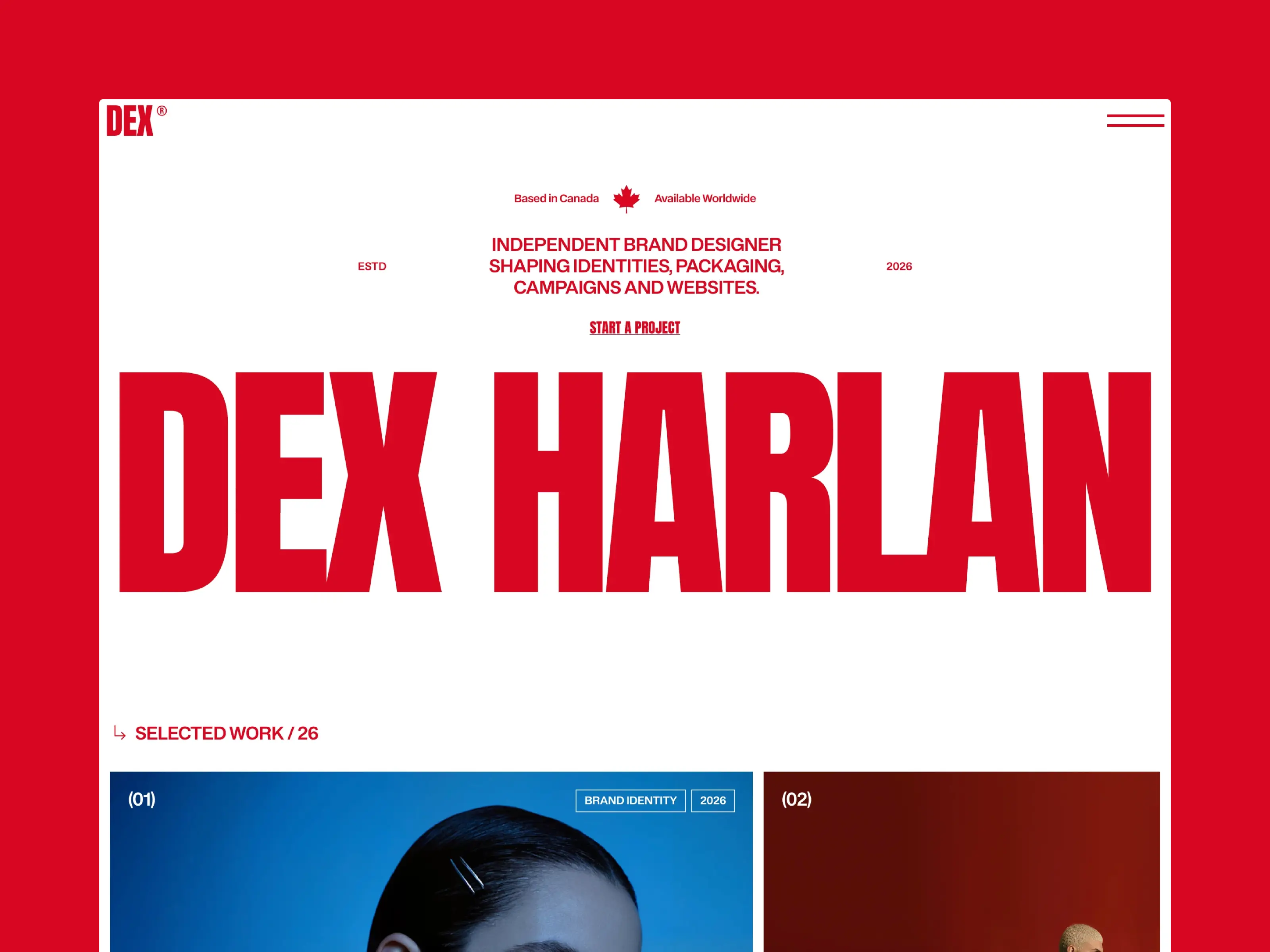
1. Dex Harlan: Brand designer portfolio
A portfolio for brand and identity designers. Large type and quiet layouts put the identity work first, and a CMS case study collection lets you show your process on each project page.
Best for: Brand designers, identity studios, creative directors
Includes: Home, Work, Work detail (CMS), Archives, Contact, 404
Price: Free
See the details and live preview on the Dex Harlan template page.
2. Calder: Minimal designer portfolio
An editorial portfolio built on large-scale type and calm spacing. It gives each project room to breathe, which works well if you want to explain your thinking rather than just post screenshots.
Best for: Product designers, UX designers, designers working in AI
Includes: 4 pages, 12 sections, 16 components
Price: Free
See the details and live preview on the Calder template page.
3. Ruhani Sethia: Warm, editorial portfolio
Warm paper tones, gold borders and a serif-led layout inspired by Indian miniature painting. Case studies show colour palettes next to the work, so clients see your choices at a glance.
Best for: Art directors, packaging designers, small creative studios
Includes: Home, Work, Case Study, About, Archives, Contact, Image Credits, 404
Price: Free
See the details and live preview on the Ruhani Sethia template page.
4. mile9: Motion studio site
A restrained, typographic site for motion design studios. The design stays out of the way so your reels do the talking, and it has been tuned for SEO and page speed.
Best for: Motion studios, animation teams, small agencies
Includes: 6 pages, 14 components
Price: Free
See the details and live preview on the mile9 template page.
5. Scalar: AI agency homepage
A conversion-focused homepage for AI agencies and automation studios. The page moves visitors from what you do, to how you work, to proof, to a clear call to action.
Best for: AI agencies, automation studios, service startups
Includes: 3 pages, 10 sections, 11 components
Price: Free
See the details and live preview on the Scalar template page.
6. Citewise: AI SaaS landing page
A modern landing page for AI and SaaS products, with product mockups, a dark dashboard section, three-tier pricing and an FAQ already built in.
Best for: AI startups, SaaS products, analytics and marketing tools
Includes: Home, Privacy, Terms, 404
Price: Free
See the details and live preview on the Citewise template page.
At a glance: which free template fits your work
Mostly visual work, like branding or illustration: Dex Harlan or Ruhani Sethia. Both have CMS case studies with detail pages.
Process-heavy work, like product or UX design: Calder. The layout leaves room for written explanation.
Video and motion: mile9. Quiet typography that lets reels lead.
Selling a service: Scalar. Built around an offer, a process and a call to action.
Selling a software product: Citewise. Product mockups, pricing tiers and an FAQ are ready to edit.
What every template on this list includes
Free does not mean stripped down. Each of these is the same quality as a paid template, and every one of them comes with:
Responsive layouts for desktop, tablet and phone, already set up.
Shared color and text styles, so a full rebrand takes one pass instead of a hundred small edits.
Page titles and descriptions you can edit in page settings for search engines.
Real page structure, not just a single landing section.
Free vs paid templates: what is the real difference?
The difference is usually scope, not quality. Paid templates tend to have more pages, more CMS collections and more specialised sections. Margins Studio, for example, has five CMS collections covering projects, team, clients, services and news. A free template gives you a strong foundation for a smaller site.
If you are a freelancer, a student or launching something new, a free template is often all you need. You can always move to a bigger template later once you know what your site has to do.
Can you launch on Framer’s free plan?
Yes. You can remix any of these templates and publish it on a free framer.website address without paying anything. The free plan shows a small Framer badge and does not support a custom domain. When you are ready for yourname.com, upgrade to a paid site plan and connect the domain.
Free Framer portfolio templates for designers, side by side
Three of the six are portfolios. All three are responsive and use the CMS for projects, so adding a case study takes minutes. A free template should not feel like a demo, and these are complete sites you can publish today.
Template | Best for | Style |
Brand, editorial and visual designers | Soft, editorial, image-led | |
Graphic designers and art directors | Bold type, high contrast | |
Product, UX and AI designers | Clean, structured, calm |
To choose between them, look at your three best projects. If they are image-heavy, Ruhani Sethia lets large images lead. If your personality and type are part of the pitch, Dex Harlan stands out in a stack of portfolio links. If you need to explain your process, Calder gives written case studies room. Then open each live preview and check the case study page, since that is where clients decide.

How to pick the right free template
Start from your content. Count how many projects, services or features you need to show and pick a template with matching pages.
Check the CMS. If you will add projects or posts often, pick a template with a CMS collection for them, like Dex Harlan or Ruhani Sethia.
Look at the mobile layout in the live preview. Most of your visitors will see that version first.
Pick the structure, not the colours. Colours and fonts change in minutes through shared styles. Page structure takes much longer to rebuild.
Free Framer template FAQ
Are these Framer templates really free?
Yes. All six are free to remix. You only pay Framer if you want a site plan, for example to connect a custom domain.
Can I use a free template for client work?
Read the Terms & License page before you build a client site. If in doubt, email me and I will tell you what is allowed.
Do I need to know code?
No. Every template is built in Framer’s visual editor, with responsive layouts for desktop, tablet and phone already set up.
Will my portfolio look like everyone else’s?
Not once you add your own work, colors and copy. Most visitors never know a site started from a template.

Written by
Chayan Panda
Independent designer and Framer developer. I design, build and maintain every template on chayan.studio.


